One workflow, one tool:
from idea to finished video.
Talk to VICS like a creative partner. Its Copilot plans your channel, writes the script, builds an editable Workspace and turns it into a finished video with voices, lip sync, subtitles and sound effects.
A 20-second UGC video in a content creator style: talking straight to the camera, selfie-style at a home desk, explaining one idea in a friendly, natural tone, with subtitles.
1,200 free credits · No credit card · Vertical 9:16 or 16:9
Work out the credits you need
Slide, pick a quality, then see the plan that fits.
Length of each video
Quality
Your need
900credits
3 videos × 20 s, voice included
Pro Standard
$28/mo
2,100 credits a month, enough for what you need.
Start with Pro StandardEstimate. Credits follow the engine each card actually uses; failures are refunded. Economy ≈ Seedance 1.0 Pro Fast / MiniMax Hailuo Fast, Standard = Wan 3.0 720p, Cinematic = Seedance 2.0 Fast.
What is VICS?
VICS is a web-based AI video studio with a built-in content assistant called Revics. You describe an idea in chat; Revics plans it, writes the script and a scene-by-scene storyboard, and turns it into editable cards in the Workspace. VICS then creates an image for each card, animates it, adds voices, automatic lip sync for speaking characters, subtitles and sound effects, and assembles a finished 9:16 or 16:9 video, so there are no clips to stitch together in an editor. Before anything is made, Revics shows which AI engine will be used and how many credits it costs. There is a free plan to start.
Last updated:
A finished video, not a pile of clips
Most AI video generators give you short clips. You still need a voice tool to record narration and an editor to line everything up, add subtitles and export. VICS does those steps inside the studio and hands you one complete video.
For most videos, you won't need a separate voice subscription such as ElevenLabs or an editing app such as CapCut Pro.
Typical AI generator
- –Short clips, one prompt at a time
- –Voice-over from a separate tool
- –Lining up clips in an editor
- –Subtitles and sound effects added by hand
- –Export, then fix and export again
VICS
- ✓Every scene from one Workspace
- ✓Voices and lip sync built in
- ✓Scenes assembled for you
- ✓Subtitles and sound effects added automatically
- ✓Change one card, only that clip re-renders
One Copilot, four specialists
You don't pick a mode. The Copilot reads your message, routes it to the right specialist and remembers your goals, channel and characters.
Strategy
Niche, ideas with a 3-second hook, series arcs and a realistic posting plan. Uses web research with sources for factual topics.
“I want a horror channel on TikTok, 3 posts a week.”
Production
Scripts timed to your target length, one line per speaker, a scene-by-scene storyboard, then images, voices and the final video.
“Write episode 1, 60 seconds, Dimas and Mel.”
Analytics
Reads the numbers you share, or a video you attach, and suggests small tests for this week. It never pretends to see your account.
“Views dropped after episode 3. Why?”
Business
An earning path step by step: your own products, brand deals, pay-per-view programs and platform programs, with rules to check. No income promises.
“How could this channel start earning?”
VICS doesn't just generate videos.
It structures them for retention.
AI that doesn't just make the video. It thinks about why people keep watching.
One map for Shorts and long-form
VICS reads your Workspace and shows where viewers are likely to leave, before you spend a second of render time.
Hook, curiosity, story, payoff, loop
- ✓ Hook is 3s: short and direct.
- ✓ No scene runs too long.
- Also check: the closing line should reconnect to the opening line.
Minute stamps and suggestions per card
Each suggestion is labeled: from YouTube's creator guidance, or common creator practice. Built from your script, not from real viewing data. No guarantee of views. Fix any finding with one click through the Copilot, and turn a finished long video into a Short.
One AI creator. Any world. Any format.
Create a creator once. Use the same one across videos, locations and formats. No camera, no crew, no reshoots.
Start creating your way
Start with an idea
Tell VICS what you want to make. VICS builds the story, scenes, narration and retention structure.
Start with your creator
Create once. Use the same creator across videos, locations and formats.
Built for creators who don't want to be on camera
Faceless creators
Create without filming yourself.
AI creators
Build a consistent AI persona.
Shorts creators
Structure every video around retention.
UGC creators
Create product videos without reshoots.
Storytellers
Turn one idea into a complete visual story.
Stop stitching your workflow together.
From idea to finished video — in one creative studio.
| Step | The traditional workflow | VICS |
|---|---|---|
| Write the script | Multiple tools | ✓ |
| Generate voice | Separate tool | ✓ |
| Generate scenes | Multiple tools | ✓ |
| Edit the video | Separate editor | ✓ |
| Structure the hook | Manual | ✓ |
| Retention planning | Manual | ✓ |
| Loop ending | Manual | ✓ |
| Character consistency | Manual | ✓Pro Plus and above |
VICS wasn't built from theory. It was tested on a real channel.
Ep.3, “Kapal Ini Bukan Sekadar Kapal”, on YouTube Shorts. Built with the same hook and retention structure you see above.
76.1%
of viewers stayed to watch
137.6%
average percentage viewed
0:28
average view duration (21-second video)
A number above 100% means the average viewer watched the video more than once through.
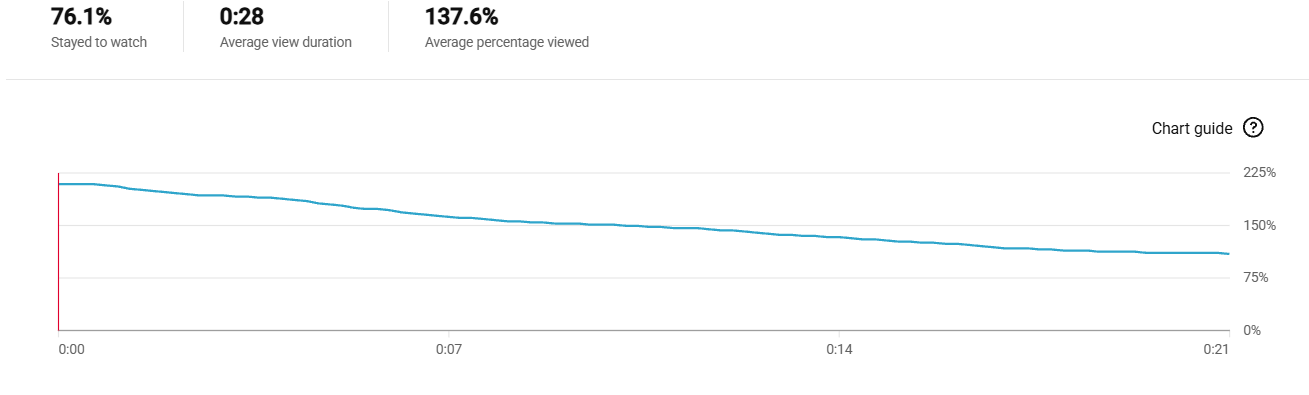
YouTube Analytics screenshot (colors adjusted to the dark theme) · One video, one channel, data as of October 2026. Results vary by creator.
VICS doesn't promise views. It gives you a workflow built around how short videos actually get watched.
See the Mythic Realities channel →In every finished video
Retention-first structure
Every video is structured around hook, curiosity, payoff and loop.
Voices that sound human
Narration with intonation and emotion, plus character reactions.
Automatic subtitles
Timed to every scene, ready for viewers on mute.
AI sound effects per scene
Add, remove, or turn them off.
Every scene in motion
9:16 moving clips, ready for TikTok, Reels and Shorts.
Consistent characters
Save a character and reuse it across scenes, with lip sync on Pro Plus and above.
Honest credits
One credit for images, video and voice. Every card shows its credits before you render; failures are refunded.
Frequently asked questions
What is VICS?
An AI video studio with a built-in content assistant, Revics, that turns an idea into a script, a storyboard and a finished video in one place.
What is Revics?
Revics is the official name of the VICS Copilot: one chat with Strategy, Production, Analytics and Business specialists. It plans content, writes scripts and storyboards, and makes the images and video from the same chat.
What is the difference between a storyboard and the Workspace?
A storyboard is the written plan of what happens in each scene, second by second. The Workspace is where that plan becomes editable scene cards that are rendered into the video.
Can I choose the AI engine?
Yes. When you ask for images or a video, Revics lists the available engines with the credits each one costs and recommends one. Nothing is charged until you confirm.
How is VICS different from an AI video generator?
A generator makes clips. VICS covers the whole workflow: planning, script, storyboard, images, voices, lip sync, subtitles and sound effects, then assembles the final video.
Do I still need ElevenLabs or CapCut Pro?
For most videos, no. Voices, lip sync, subtitles, sound effects and assembly happen inside VICS, and you download one finished video. You can still use other tools if you want extra editing.
Do I need to be on camera?
No. VICS is built for faceless content and for consistent AI characters.
Can characters talk?
Yes, on plans with lip sync. A card with one speaking character gets lip sync automatically, using the voice you chose.
How is pricing counted?
In credits. One credit covers images, video and voice; each engine has its own rate, and every card shows its credits before you render. Failed jobs are refunded automatically.
Is there a free plan?
Yes: 1,200 credits with a watermark, no card required (Indonesian accounts get 500).
Can I use VICS on my phone?
Yes. VICS works in the mobile browser and can be installed on a phone or tablet like an app, with a notification when your video is ready.
Which languages are supported?
Revics works in English and Indonesian.
Does VICS guarantee views?
No. VICS helps you plan and produce; results depend on your content and each platform.
Pricing
Start free. Upgrade when your first video works.
$28 / month
- ✓2,100 credits per month
- ✓Every image & video engine
- ✓No watermark
- ✓Voices, subtitles and SFX included
One subscription. One workflow. No creative stack to manage.
More plans: Pro Plus $59 (consistent characters, 1080p) · Pro Max $99 · Agency $499 · See plans →
Create your first video.
1,200 free credits · No credit card · Vertical 9:16 or 16:9